
amicaassist@gmail.com
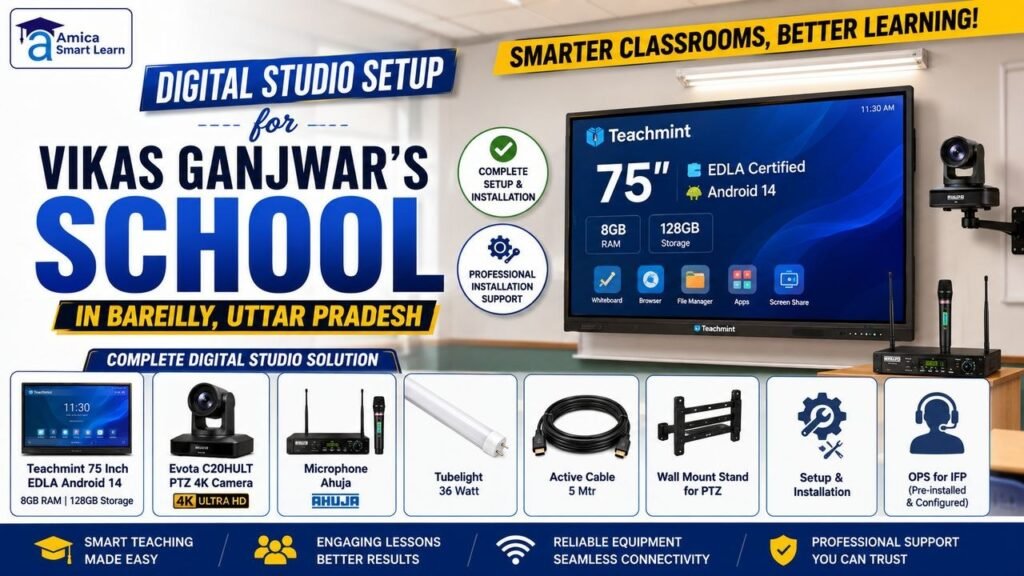
Setting up a school digital studio means fitting one room with the right interactive flat panel, PTZ camera, microphone, lighting, and cabling, then installing and calibrating them as one connected system rather than a pile of separate gadgets. This is exactly what Amica Smartlearn planned and installed for Vikas Ganjwar at his school in DD Puram, Bareilly, Uttar Pradesh — a full teaching-and-recording studio built around a 75-inch interactive panel, a 4K PTZ camera, a professional microphone, studio lighting, and clean cable routing.
If you’re researching a similar setup — for a school, a coaching centre, or an institute in Bareilly or elsewhere in Uttar Pradesh — this case study walks through exactly what was chosen, why, and how it was installed.
A digital studio setup typically has five components: a large touchscreen display for teaching or presenting, a camera that can pan/tilt/zoom to follow the presenter, a dedicated microphone for clean audio, even studio-grade lighting, and cabling that can carry 4K video and data without signal loss over distance. Getting the products right matters less than getting the integration right — each device needs to work with the others without lag, dropouts, or mismatched cables.
For Vikas’s school in DD Puram, Bareilly, the goal was a room that could double as a classroom, a recording studio, and a video-call space — without permanent clutter or visible wiring.
For a serious school studio, a 75-inch Android-based interactive flat panel with at least 8GB RAM, 128GB storage, and 4K resolution gives enough screen size and processing power to run teaching software, video calls, and content creation without lag. Vikas’s studio uses the Teachmint X2 series 75-inch Interactive Flat Panel, which meets all of these on top of official Google EDLA certification — meaning direct, verified access to the Google Play Store, Google Workspace apps, and Play Protect security.
Key hardware and display specs:
Two model options compared:
| Model | Audio & Video | Best For |
| Teachmint X2 Plus | Dual 20W speakers (40W total); no built-in camera/mic | Users who already own an external camera and microphone |
| Teachmint X2 Pro | Built-in 48MP AI camera, 8-array noise-cancelling mic, 40W speakers | A complete out-of-the-box solution for hybrid learning |
A PTZ (Pan-Tilt-Zoom) camera lets the shot follow the presenter automatically — rotating, tilting, and zooming to keep them in frame without a second person operating the camera. For Vikas’s studio, the Evota C20HULT PTZ 4K Camera was chosen for its 4K Ultra HD resolution, Sony CMOS sensor, and 20x optical zoom, all controllable remotely or via AI tracking.
Key features: a Sony CMOS sensor for strong low-light clarity; smooth pan-tilt-zoom motion with no blind spots; AI motion detection that keeps the subject centred automatically; infrared night vision; two-way audio via a built-in mic and speaker; and broad connectivity (HDMI, USB, Type-C, LAN/IP streaming with H.264/H.265 compression).
Two camera options compared:
| Camera | Best Suited For | Core Specs |
| Evota C20HULT PTZ | Large lecture halls, wide commercial spaces | 4K UHD, 20x optical zoom, all-weather build, AI tracking, full remote management |
| Evota 12X 4K PTZ | Standard classrooms, hybrid studios | 4K, 12x optical zoom, 16x digital zoom, 71° wide-angle, VISCA/Pelco protocol support |
For clean, feedback-free vocal recording, a wired dynamic microphone with a supercardioid pickup pattern is the standard choice — it captures sound from directly in front while rejecting side and rear noise. Vikas’s studio uses the Ahuja PRO+ 3400, from Ahuja Radios, one of India’s most established PA and audio equipment brands.
Why this mic fits a school studio:
| Product | Standout Feature | Specs |
| Wipro Garnet LED Batten 36W | LM-80 tested LEDs, aluminium heat sink prevents dimming | 6500K cool daylight, ~3600 lumens, 2.5kV surge protection |
| Crompton Laser Ray Maxx 36W | Shock-proof polycarbonate body, wide light spread | 6500K, flicker-free electronic driver |
| Product | Standout Feature | Specs |
| Philips MASTER TL-D Super 80 36W | Higher lumen output, better colour rendering | 6500K, ~3350 lumens, standard G13 base |
| OSRAM LUMILUX 36W/827 | Soft, warm tone instead of stark daylight | 2700K warm white, G13 base, ~15,000-hour life |
Standard cables lose signal strength over distance, causing flickering video or slow data transfer once a camera and panel are more than a couple of metres apart. Active cables solve this with a small built-in signal booster, and Vikas’s studio uses 5-metre active cables for both USB-C and HDMI runs.
The Amica Smartlearn technical team handled the full installation on-site at Vikas’s school in DD Puram, Bareilly — mounting the 75-inch panel at teaching height, aligning and testing the PTZ camera’s angle, positioning the Ahuja microphone for clean pickup, balancing the lighting to avoid on-screen shadows, routing every cable out of sight, and test-running the full system together before handover.
| Feature | OPS Module | External PC/Laptop |
| Cable management | Zero extra cables | Multiple HDMI/USB cables |
| Look | Clean, built-in | Bulky separate unit |
| Upgrades | Swap the module | Replace the whole device |
| Portability | Fixed inside the panel | Separate portable unit |
A fixed wall mount keeps the camera at a consistent height and angle for every session, removing the need to readjust it before each recording and keeping the studio floor free of tripods. That’s the setup used in Vikas’s studio — a steady, permanent camera position that gives every session the same professional framing.
| Item | Purpose |
| Teachmint 75-inch IFP (Android 14, 8GB/128GB) | Main smart display and teaching board |
| Evota C20HULT PTZ 4K Camera | Sharp, trackable video recording |
| Ahuja PRO+ 3400 Microphone | Clear, noise-free audio |
| 36W LED/Tube Lights | Even, professional studio lighting |
| 5-metre Active Cables | Stable, long-distance connections |
| OPS Module | Windows + Android computing in one panel |
| Wall Mount PTZ Stand | Fixed, steady camera positioning |
This is the complete story of the digital studio setup built for Vikas Ganjwar’s school in DD Puram, Bareilly, Uttar Pradesh — a 75-inch Teachmint panel, an Evota PTZ camera, an Ahuja microphone, studio lighting, active cabling, an OPS module, and a fixed wall-mounted camera, all installed and tested by Amica Smartlearn. The result is a studio that looks and performs like a professional setup while staying simple to use every day.
If you’re in Bareilly or elsewhere in Uttar Pradesh and want a similar studio for your school, coaching centre, or institute, you can explore more setups and solutions at Amica Smartlearn or contact the team directly.
If Vikas’s setup is the kind of studio you’re picturing for your own home, coaching centre, or school, Amica Smartlearn can plan and install the same thing for you — from the interactive panel down to the last cable.
📞 Call us: 9125161262
📧 Email us: amicaassist@gmail.com
🌐 Visit our website: amicasmartlearn.com
📍 Visit our office: Amica Solution, Roopa Tower, Aman Vihar, Sahastradhara Road, Dehradun, Uttarakhand
🧾 GSTIN: 05DUIPK1129K2ZL
📍 State: 05-Uttarakhand
A room that fits a 75-inch panel with clear viewing distance (roughly 8–10 feet) and space for the PTZ camera to have a clean angle on the presenter is generally enough — most studio rooms in the 120–200 sq. ft range work well.
Not if the panel has an OPS module — it adds a full Windows PC inside the panel itself, so no external computer is needed.
Yes — the same panel, camera, and microphone combination supports live video calls, live classes, and offline recording without reconfiguration.
It works for anyone recording regularly from one room — teachers, coaching institutes, YouTubers, and businesses doing product demos or webinars.