
Short answer: for Classes 1–5, a 65-inch interactive flat panel suits most rooms where the last row sits within about 5 metres; beyond that, look at 75 inches. Mount it lower than you would for senior classes, or on a stand, so small children can actually touch it. Keep the brightness modest and the front row at least about 1.2 m back.
By the Amica Smart Learn team · Updated 15 November 2026 · Sources are linked in the text and listed at the end

Children's Day fell on 14 November, and it is a good moment to think about the youngest users of classroom technology. If you have ever watched a Class 1 child walk up to a board, stretch on tiptoe and still fall short, you know why this guide exists. Most smart-board advice in India is written with senior classes, coaching rooms or office meeting rooms in mind. A six-year-old is a very different user: shorter arms, smaller fingers, a shorter attention span and a lot more excitement.
This guide is for principals, managers and teachers of primary sections who are about to buy or receive an interactive flat panel. We kept it practical: what size, how high, what to switch on or off, and what the 2026 funding news actually means for Classes 1–5.
Because the money and the plans are finally reaching the lower classes. On 15 September 2026, the Uttar Pradesh Cabinet approved a proposal to develop 14,429 primary schools under the Basic Education Council as smart schools, at about ₹2.07 lakh per school (PTI via ThePrint, 15 Sep 2026). In Bihar, the Education Minister has asked for smart classrooms in all 700 Saraswati Vidya Niketan model schools by 31 March 2027 (APAC News Network, 3 Nov 2026).
There is a catch that many people miss. The smart-classroom component of Samagra Shiksha, the main central scheme, covers government and aided schools with Classes 6 to 12, according to a Lok Sabha reply reported on 1 December 2025 (Careers360). So a primary-only school usually has to look at a state plan, CSR support or its own funds.
| Route | Who it covers | What is on record | Source and date |
|---|---|---|---|
| Samagra Shiksha smart classrooms | Government and aided schools with Classes 6–12 | ₹2.40 lakh non-recurring for 2 smart classrooms per school; ₹38,000 recurring, including e-content and electricity | Lok Sabha replies, reported 29 Jul 2025 and 1 Dec 2025 |
| Uttar Pradesh smart schools plan | 14,429 primary schools (Basic Education Council) | About ₹2.07 lakh per school; ₹300 crore provision; internet and ICT labs named by PTI | UP Cabinet, 15 Sep 2026 |
| Bihar model schools | 700 Saraswati Vidya Niketan schools | Smart classrooms targeted by 31 Mar 2027; budget not stated | Departmental review, reported 3 Nov 2026 |
| Private school or CSR funding | Any school | Depends on the school or the donor | Not applicable |
For a wider view of PM eVidya, DIKSHA and the other national programmes, read our guide to government initiatives for digital classrooms in India.
An interactive flat panel (IFP) is a large touch-screen display that replaces the blackboard and the projector. The teacher and children write on it with a pen or a finger, play videos, and open lessons from a pen drive or the internet. A few terms appear in every quotation, so here they are once:
Measure from the screen wall to the farthest child's seat, then choose the smallest panel whose range covers it. A simple AV rule of thumb keeps the farthest viewer within about six times the screen's height and the nearest viewer at least about one and a half times away. The formal method is the AVIXA display image size standard (DISCAS), which also looks at how big the text on screen is. Primary lessons use big letters and pictures, so the rule of thumb works well here.
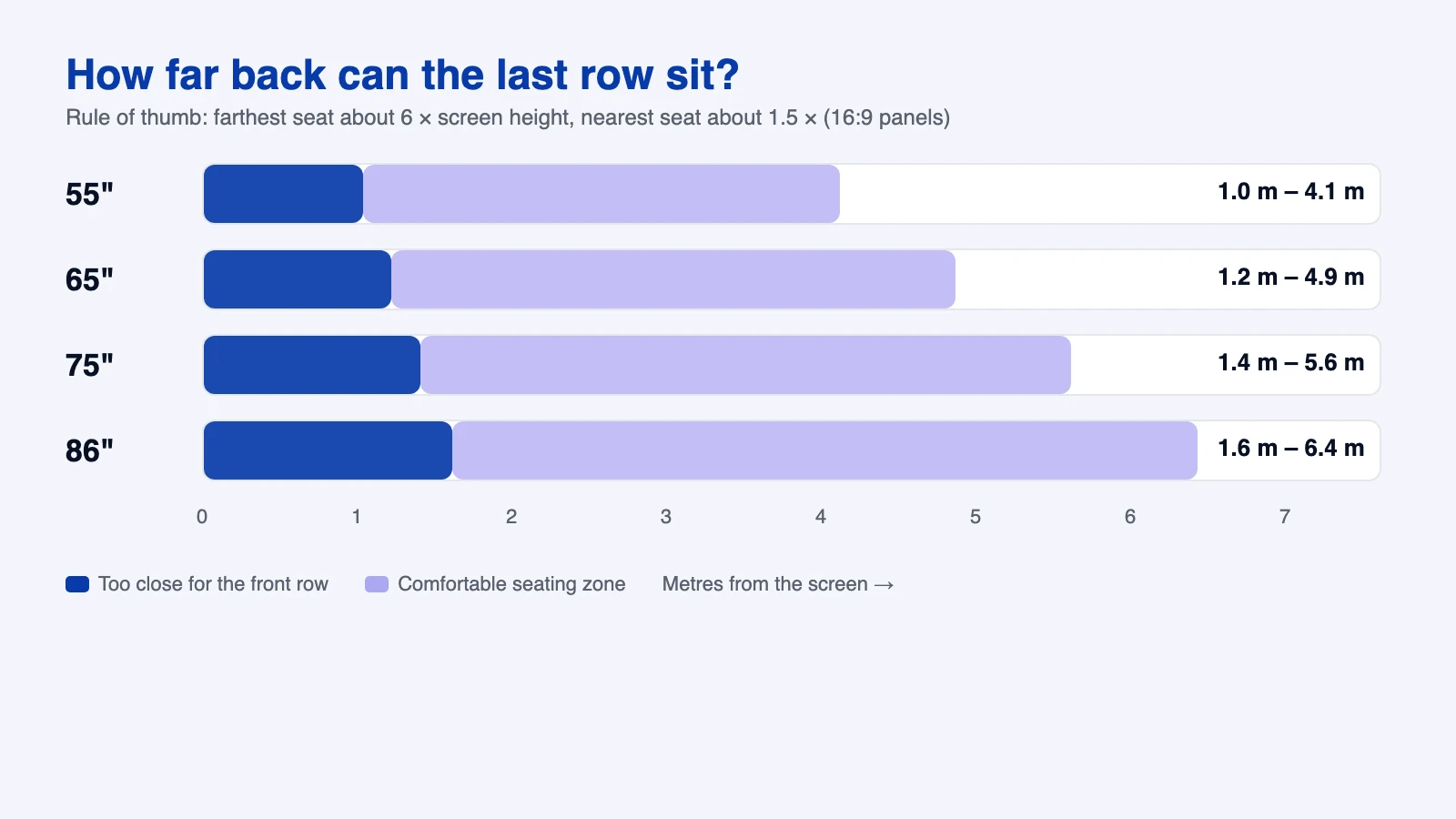
| Panel (16:9) | Screen height | Nearest seat (about 1.5×) | Farthest seat (about 6×) | Typical fit |
|---|---|---|---|---|
| 55-inch | 68 cm | 1.0 m | 4.1 m | Small rooms, activity corners, pre-primary |
| 65-inch | 81 cm | 1.2 m | 4.9 m | Most primary classrooms |
| 75-inch | 93 cm | 1.4 m | 5.6 m | Deeper rooms or 40+ children |
| 86-inch | 107 cm | 1.6 m | 6.4 m | Large rooms and multipurpose halls |
Screen heights come from the diagonal and a 16:9 shape, rounded. Bigger is not automatically better for little ones. On a huge panel in a small room, the front row spends the whole period looking up, and the top of the screen is far beyond their reach anyway.
Lower than for senior classes. With a 65-inch panel, a bottom edge at around 75 cm from the floor puts roughly the lower third of the screen within reach of most 5–8 year olds, and leaves the upper part for the teacher. We found no Indian or international standard that fixes one mounting height for primary classrooms. Panel makers say it depends on the children's height and the room. The best published reference we found is the children's reach table in the US ADA 2010 Standards. It is advisory and written for switches and controls, but it is a useful starting point (US Access Board).
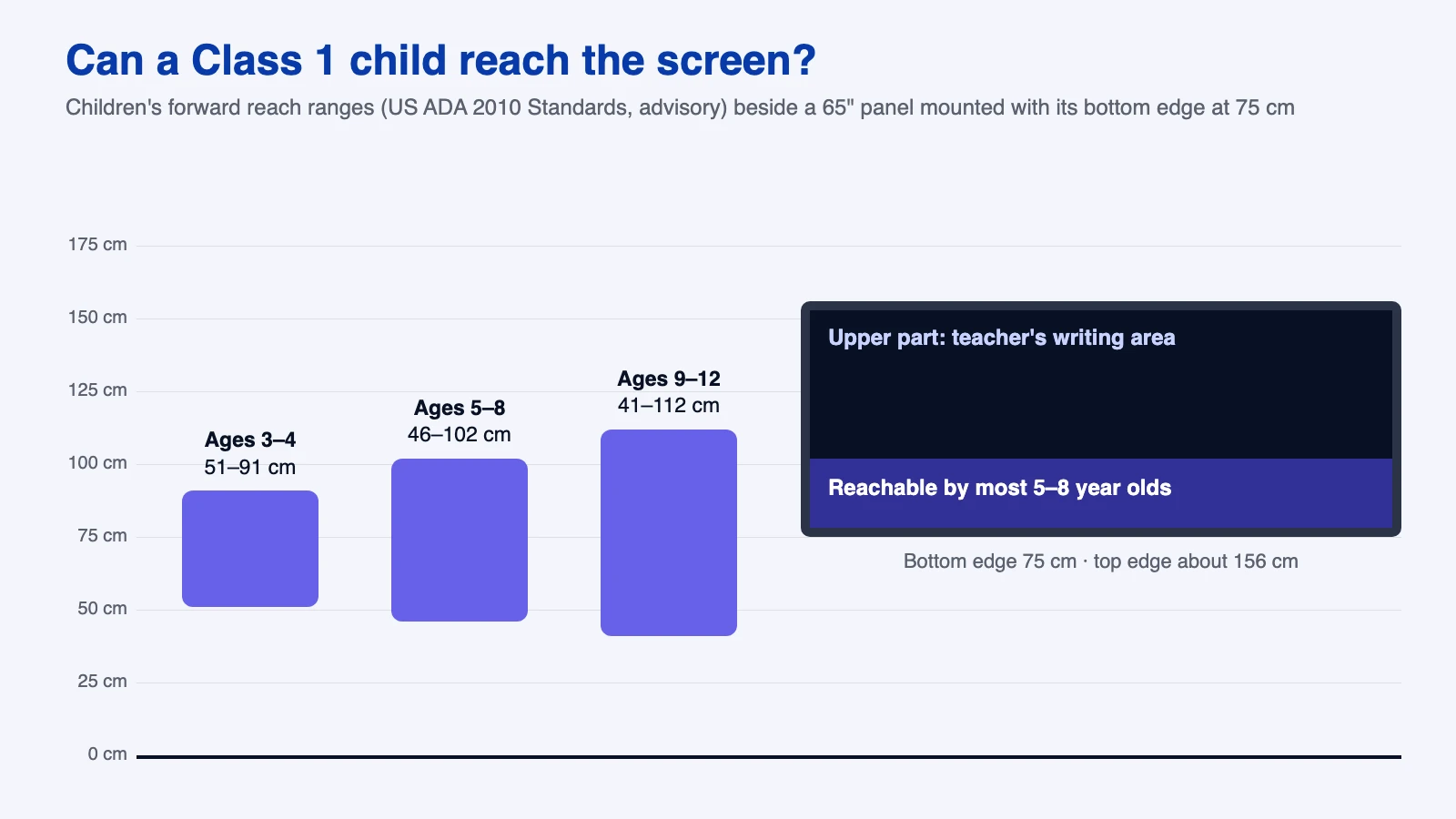
| Age | Roughly | Lowest comfortable reach | Highest forward reach |
|---|---|---|---|
| 3–4 years | Nursery, LKG | 51 cm (20 in) | 91 cm (36 in) |
| 5–8 years | UKG to Class 3 | 46 cm (18 in) | 102 cm (40 in) |
| 9–12 years | Class 4 to Class 7 | 41 cm (16 in) | 112 cm (44 in) |
The tape test. Before drilling, stick masking tape on the wall where the bottom and top edges will sit. Call three or four children from your youngest class and ask them to touch the middle. If they stretch, lower it. If the teacher has to bend all period, raise it a little or keep the teacher's tools at the bottom of the screen. It takes ten minutes and saves years of awkward lessons.
Used sensibly, yes. The bigger risks are glare, sitting too close and long unbroken screen time, not the panel itself. The American Academy of Ophthalmology says there is no scientific evidence that blue light from digital devices damages the eye. It does say screen use can cause eye strain (AAO, 10 Mar 2021). Many vendors advertise "low blue light" or "eye care" modes. These are manufacturer claims, so ask for the actual test certificate if a seller uses them as a reason to charge more.

Fast, simple and hard to break beats feature-packed. A Class 2 teacher has about 35 minutes and 40 excited children. Whatever the panel does should open in seconds.

It is less about the panel and more about planning every room the same way. This is our team's video of a school-wide smart classroom project at Delhi Public School, Ranipur, Haridwar, which the video describes as 170 classrooms. It is a whole-school project rather than a primary-only one, but the planning is the same: measure, mount, wire, test and train the teachers.
Video: Amica Smart Learn on YouTube.
Ask for everything in writing, and test the room before the truck arrives. Use this list in your next meeting with any vendor, including us.
Planning panels for a primary section?
We can visit your school, run the tape test with you and suggest a size room by room. See our smart classroom setup in Uttar Pradesh page, or call the number in the header.
For most Class 1–5 rooms, a 65-inch panel works well when the farthest child sits within about 5 metres. For deeper rooms, choose 75 inches. For small rooms or pre-primary corners, 55 inches is enough. Measure the farthest seat first.
There is no single official height. As a worked example, a 65-inch panel with its bottom edge near 75 cm keeps roughly the lower third within reach of most 5–8 year olds, based on the ADA advisory reach range of about 46–102 cm. Do a tape test with your youngest class before drilling.
The American Academy of Ophthalmology says there is no scientific evidence that blue light from digital devices damages the eye, though screens can cause eye strain. Keep the brightness modest, avoid window glare, seat the front row at least about 1.2 m from a 65-inch panel and build in regular breaks.
According to a Lok Sabha reply reported on 1 December 2025, the Samagra Shiksha smart-classroom component covers government and aided schools with Classes 6–12. Primary schools usually depend on state plans, such as Uttar Pradesh's plan for 14,429 primary schools approved on 15 September 2026, or on CSR and school funds.
It means the panel is certified under Google's Enterprise Devices Licensing Agreement programme and ships with Google Mobile Services, so the Play Store and Google apps such as Classroom work officially. Check the exact model before paying extra for it.
Yes. The whiteboard, saved lessons and files from a pen drive work offline. You need internet for the Play Store, cloud files, live classes and online content.